One agent. Every surface.
Veritly's AI isn't a chatbot bolted onto a BI tool. It works inside your dashboards, documents, and automations — so an answer can become a report, a live tile, or a scheduled job without anyone rebuilding it somewhere else.
The agent sits in the middle, not off to the side.
Most AI features can only talk about your data. Veritly's agent operates on it — building the dashboard, writing into the sheet, wiring the automation — because it reads and writes the same governed model every other surface uses.
Nothing gets stranded in a chat window.
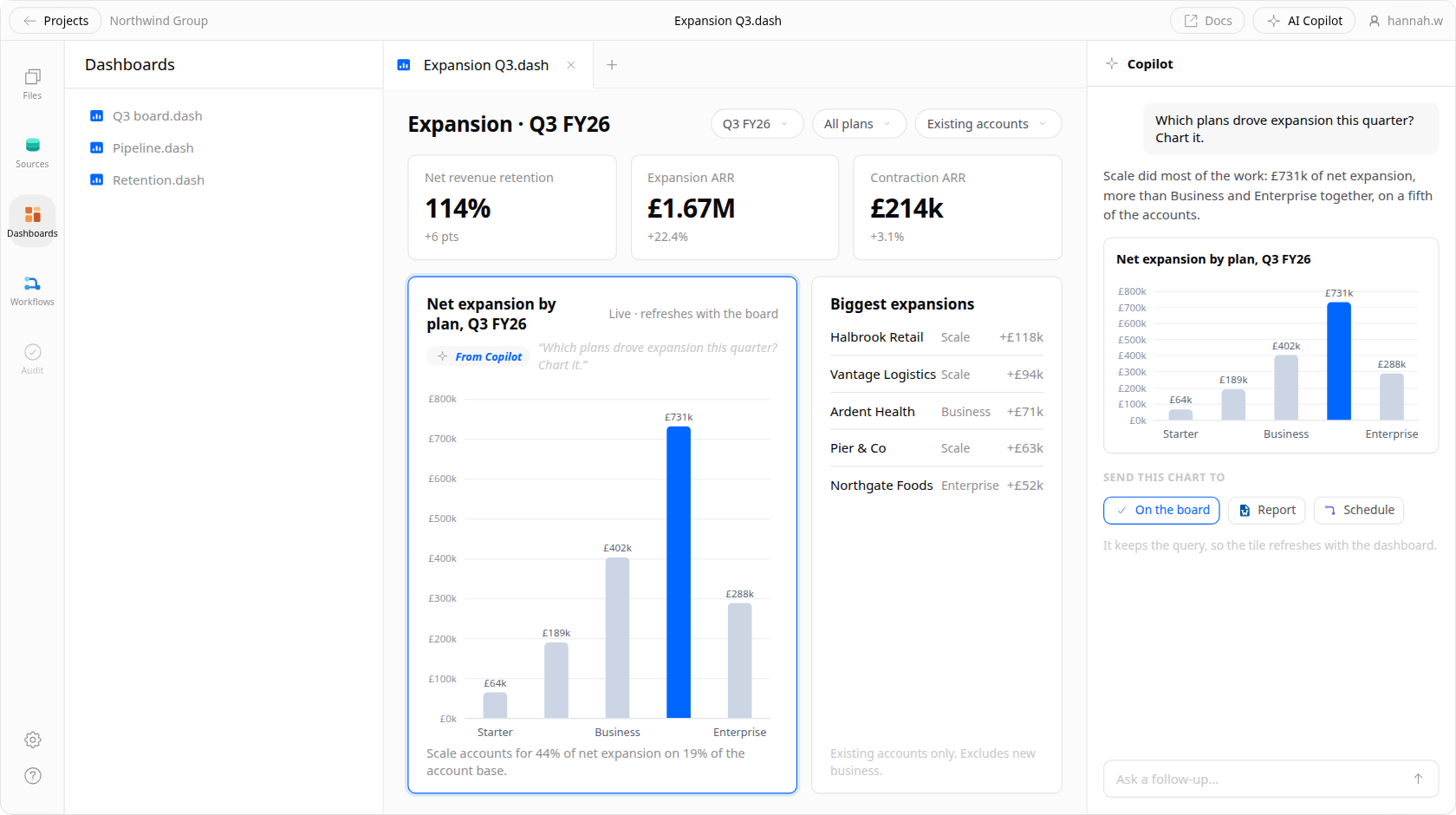
An answer doesn't have to stay an answer
Ask a question in chat and the result isn't trapped in a transcript. Promote it to a dashboard tile, drop it into a doc, or schedule it as a recurring job — the same object, moving between surfaces instead of being rebuilt in each one.
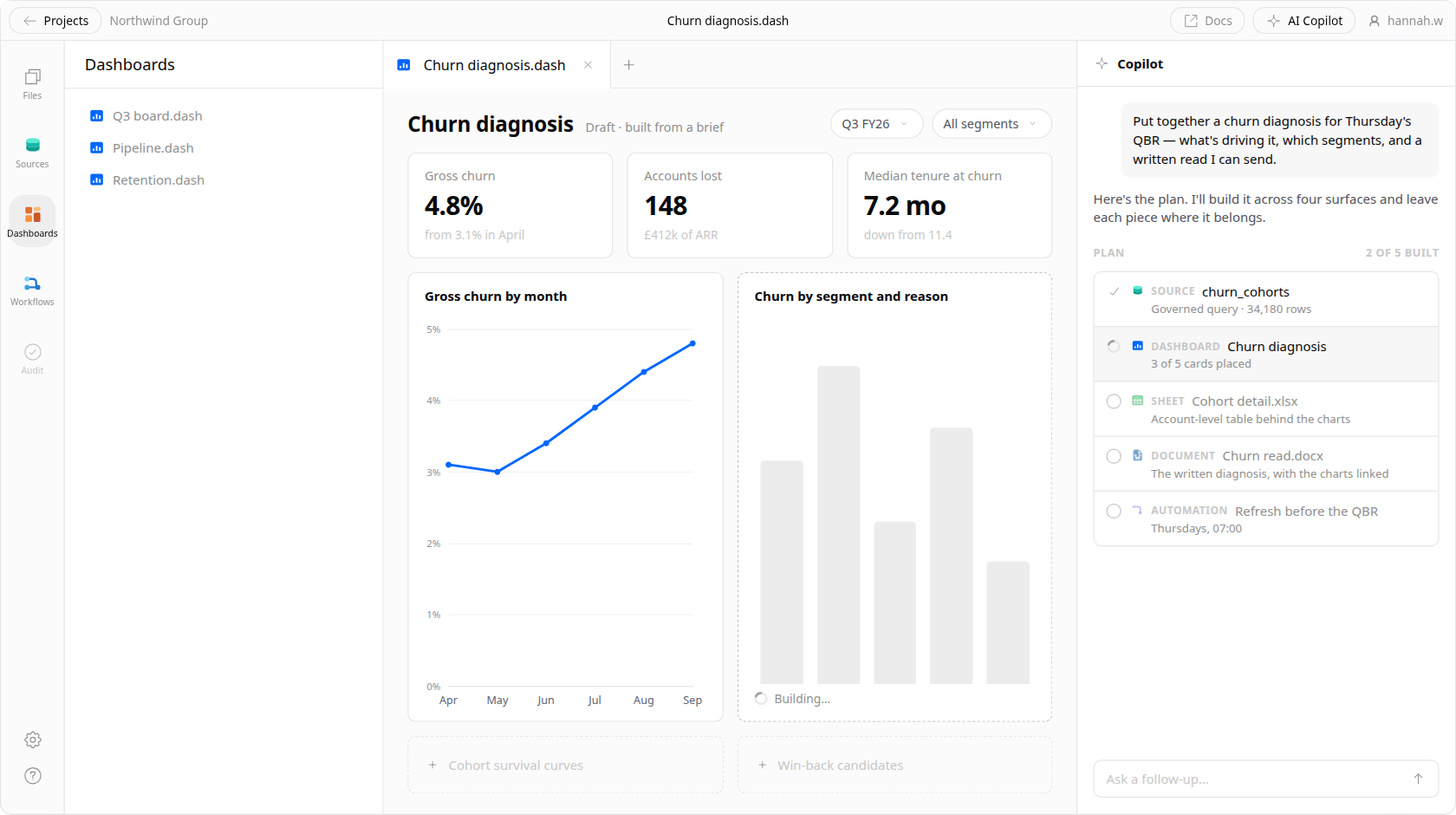
Describe the deliverable, get the first draft
Tell Veritly what you're producing — a cohort breakdown, a churn diagnosis, a board pack — and it assembles the query, the chart, the sheet, and the write-up across whichever surfaces the deliverable actually needs.
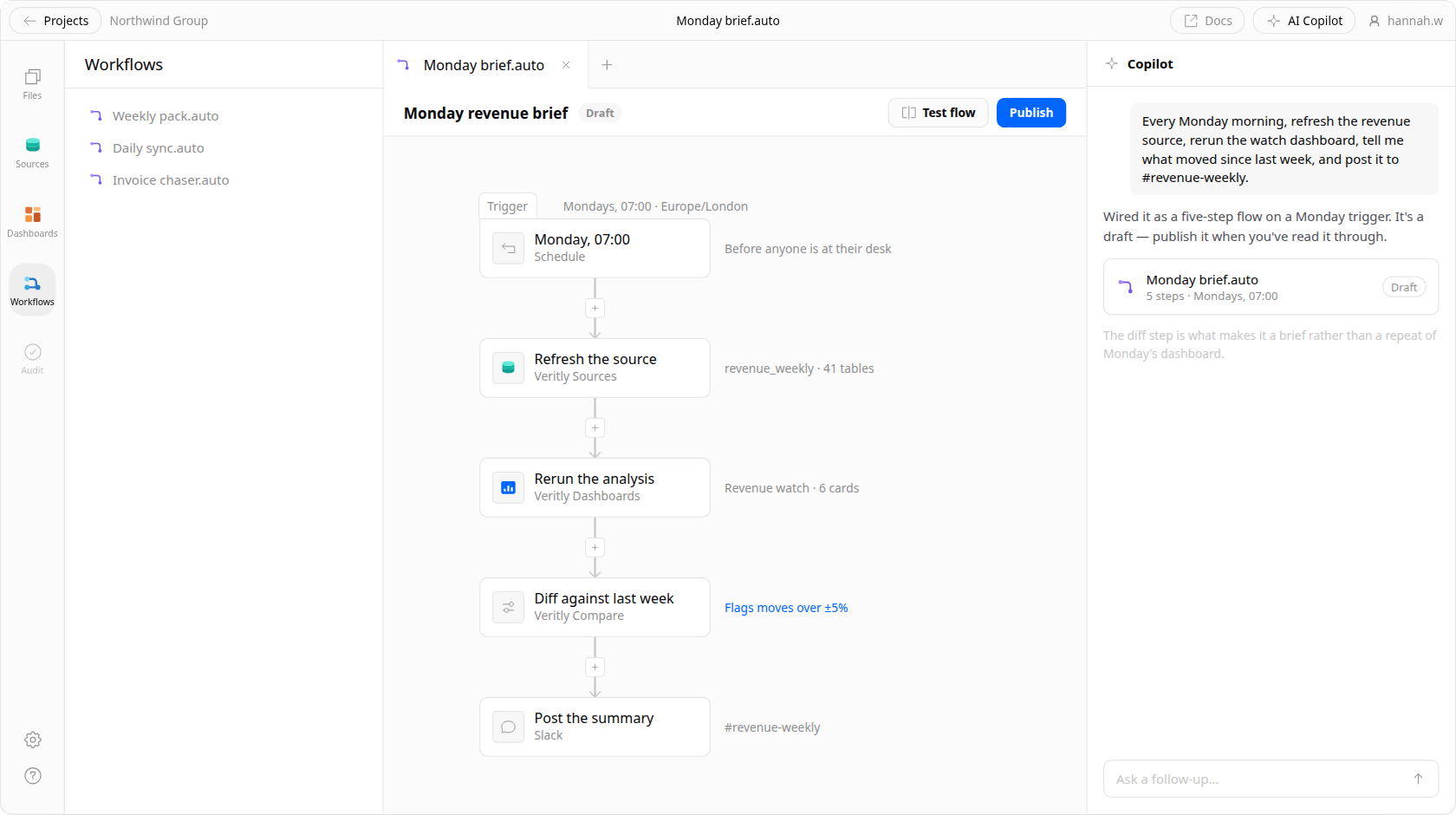
It builds the automation, not just the answer
Say what should happen on Monday morning and the agent wires the pipeline: refresh the source, rerun the analysis, diff it against last week, and post the summary where the team will read it.
An in-depth look at the platform.
A full run through the product — the agent answering against your governed model, then building the dashboard, the document, and the automation that all come out of that same answer.
One agent, the whole workflow.
The same agent carries a question from asked to answered to automated — no handoff between tools in the middle, and one set of controls over all of it.
- 01Answer a question
“Why did enterprise retention drop in Q3?”
Plain-English question in, governed SQL and a checked answer out.
sql + checked answer - 02Build a dashboard
“Put that on a board the client can filter.”
Generate a real, filterable view from a one-line brief — not a screenshot.
live dashboard - 03Lay out a model
“Model next year off those cohorts.”
Describe the calculation; the agent builds the sheet and the formulas.
spreadsheet + formulas - 04Wire an automation
“Run this every Monday at 7.”
Turn any of the above into a scheduled job with an audit trail.
scheduled job - 05Diagnose a change
“Retention moved again — what caused it?”
When a metric moves, it decomposes by segment and names the cause.
segment breakdown - 06Write it up
“Write this up for the board pack.”
Turn a finished analysis into a doc or deck a client can actually read.
doc or deck
Governing every turn above
Manage AI at scale
One place to see which agents exist, what they're allowed to touch, and who's using them.
Permissions the agent can't talk its way around
Row and column access is applied at the query, so the agent physically cannot return what the asker isn't cleared for.
Test with evals before you trust it
Run a question set against a change and see what regressed before the agent reaches your team.
Improve trust with a semantic model.
The difference between an agent that guesses and one you'd put in front of a client is what it's allowed to reach for.
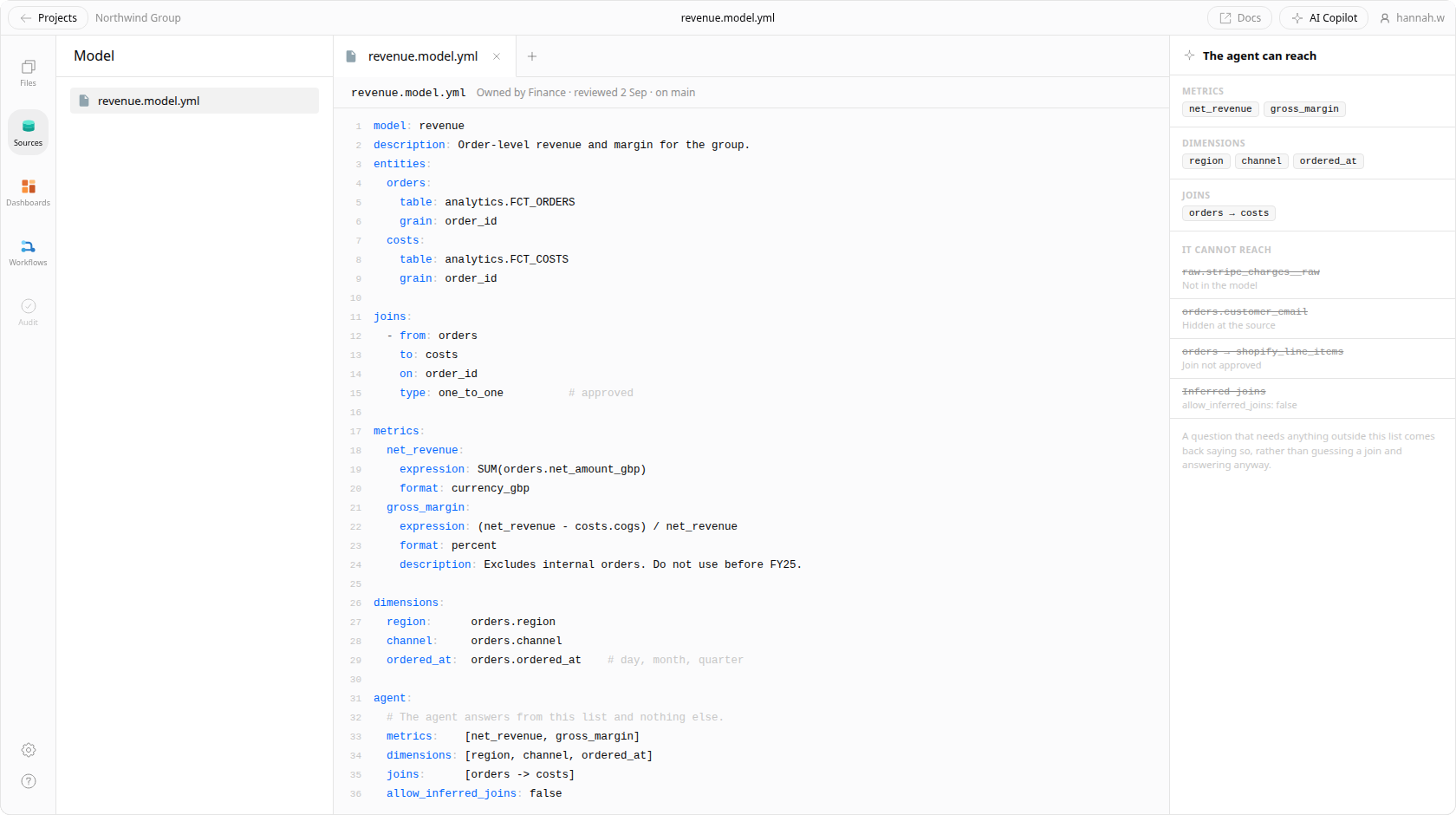
Curate the responses
Decide which fields, metrics, and joins the agent is allowed to reach for. It answers from the definitions you've approved, not from whatever it can infer about your schema.
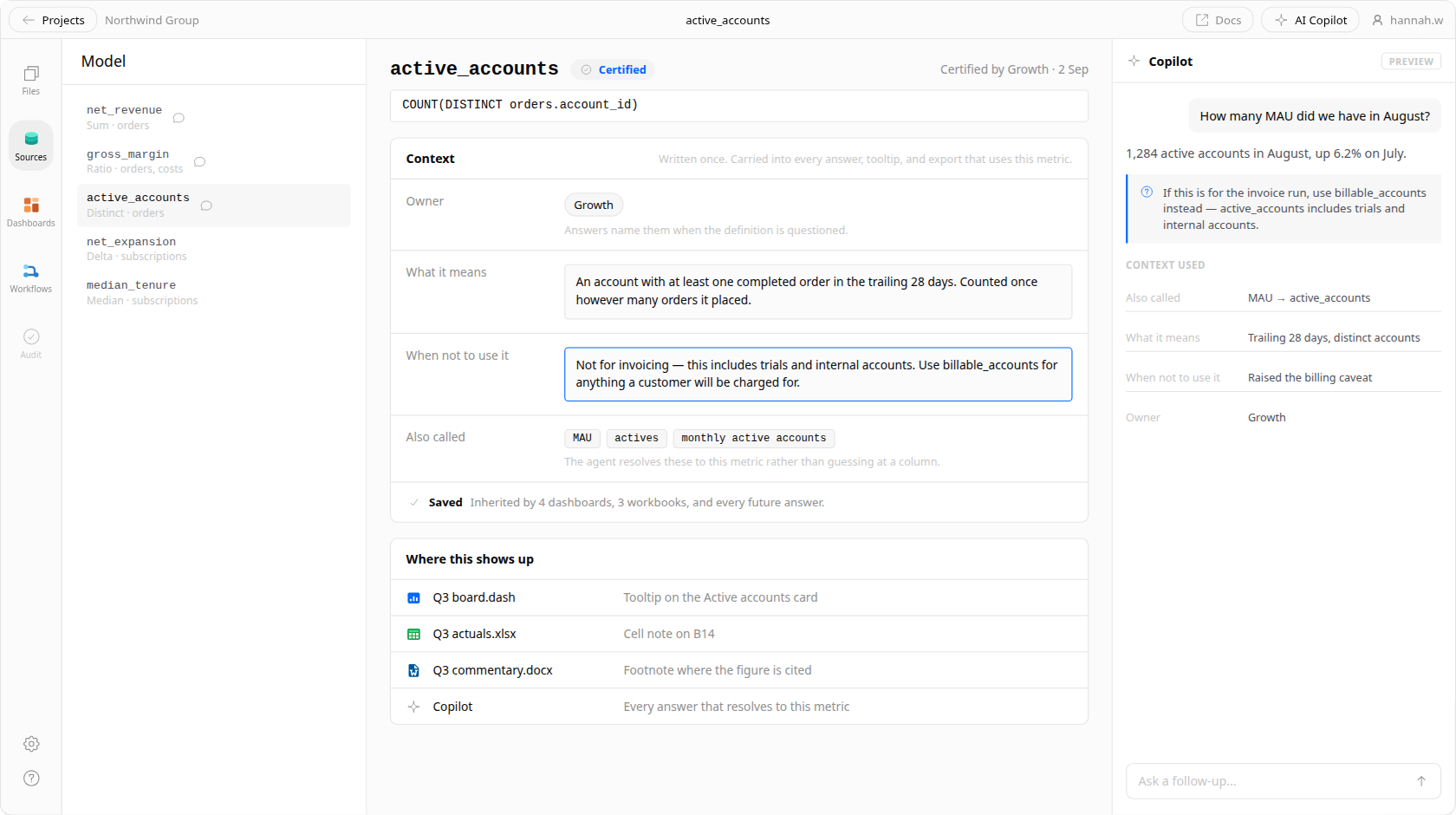
Add context as you go
Annotate a metric once — what it means, when not to use it, which team owns it — and every future answer inherits that context instead of relearning it from column names.
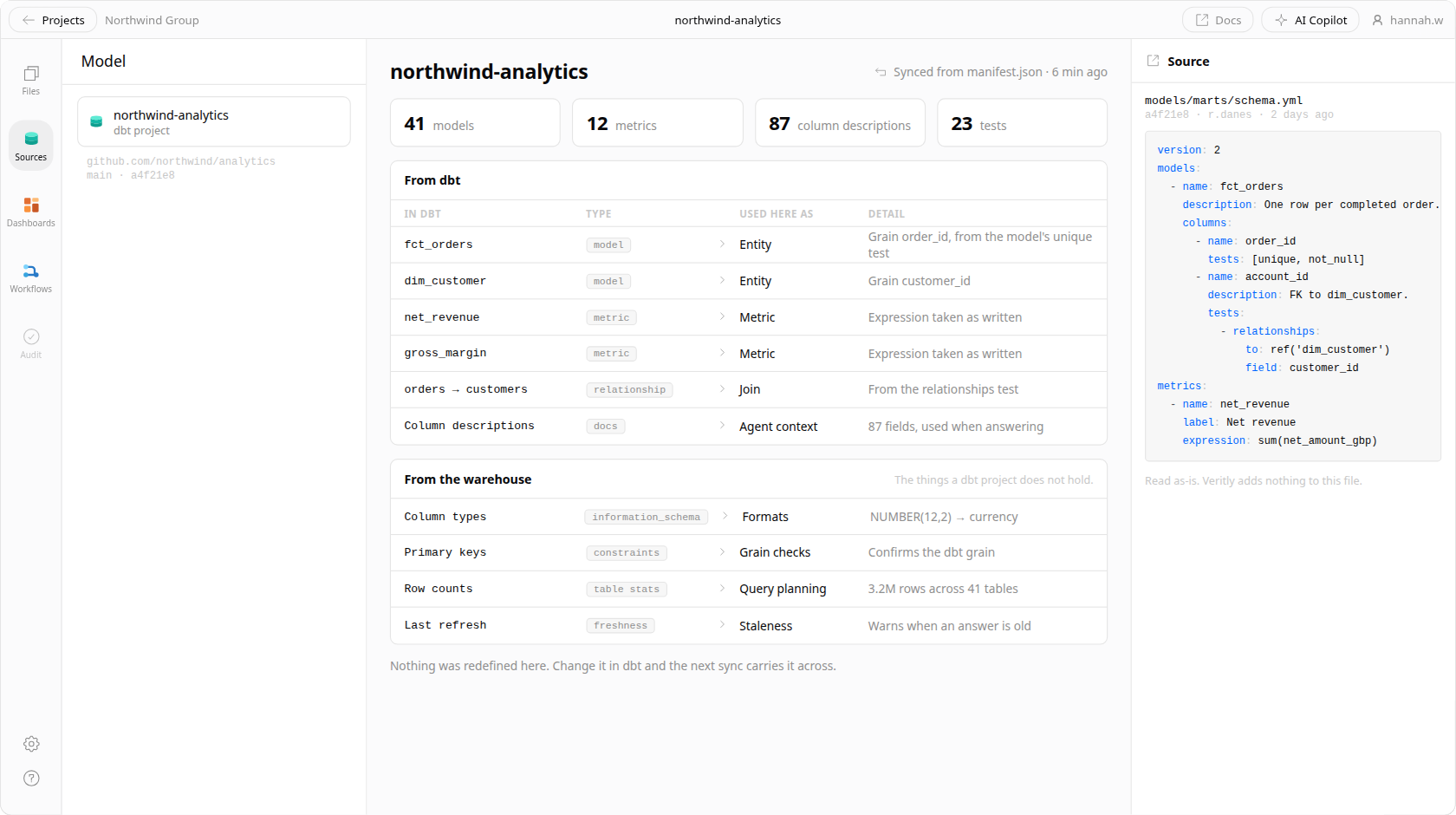
Use the metrics, joins, and metadata you already have
Veritly reads your existing dbt models and warehouse metadata rather than asking you to redefine the business in a new tool first.
Our approach to AI.
Show the work, always
Every answer ships with the query that produced it. If the agent can't show you how it got there, you shouldn't act on it — so we never hide the step.
Governed before it's clever
The agent answers from your semantic model, not from a guess at what your columns mean. Constraints make it useful; an unconstrained agent is a liability on client work.
It drafts, you decide
AI gets you to a checked first draft faster. It doesn't sign off on the number that goes in front of your client — you do.
Frequently asked questions.
Does my data get sent to a model provider for training?
No. Your data is never used to train a model. Queries run against your own warehouse, and only the results needed to answer the question pass through the model — never your full dataset.
What stops the agent from inventing a number?
It doesn't answer from memory. Every response is produced by a SQL query against your warehouse, and the query is shown next to the answer so you can verify it before acting.
Can it see data a user isn't allowed to see?
No. Row and column permissions are enforced at query time, before results are returned, so the agent operates under exactly the same access rules as the person asking.
Do I need a semantic model before this is useful?
No, but it gets meaningfully better with one. Veritly can read your existing dbt models and warehouse metadata to bootstrap, and you can curate definitions over time rather than up front.
Which models does Veritly use?
We route to current frontier models and evaluate new ones as they ship. The semantic layer and permission model sit between the model and your data, so the guarantees don't change when the underlying model does.
Try it on your own data.
Veritly is in private beta. Join the waitlist and we'll bring you in as capacity opens up.